Selecting a Submission


PayGate DDMS automatically creates BACS submissions that contain only collections that are currently due. It does this by looking at your payer's collection schedules and the Direct Debit scheme rules to ensure that submissions contain the correct collections.
You should make it part of your routine to regularly open the Pending Submission page in PayGate. Do this by clicking 'Collections' from the main menu and then choosing 'Process Submissions'. PayGate will calculate all of the collections that are pending at that moment in time.
PayGate DDMS treats AUDDIS submissions and normal debit collections separately. In the example below we can see that there are two pending submissions. There is an AUDDIS submission containing 10 DDI (Direct Debit Instructions) and a debit collections submission containing 10 debits.
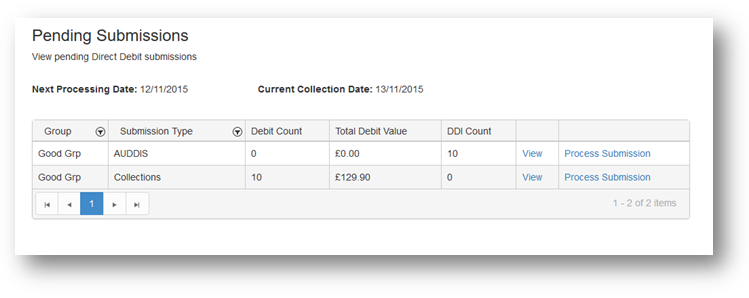
You can view the contends of each submission by clicking the 'View' link. This will take you to the View Submission page. The View Submission page show all of the individual collections or DDI's that make up the submission.
Processing Submissions
Processing a submission will convert the pending submission into a BACS submission. The submission will be checked for errors and then be placed in the Actions queue ready for signing and approval. Click the 'Process Submission' link to start the process.
How PayGate determines what goes into a submission
Look Ahead
By default, when you create a new PayGate DDMS group, the Submission Window type is set to Multiday. What this means is that when PayGate looks at your payer's schedules to determine what goes into a submission; it will look ahead a set number of days. Any pending collections within that 'window' of days are put into the submission. This allows you to carry out the submission process say once a week and all collections for the week(s) ahead will be rolled into the current submission.
By default the Multi Day Windows Size is set to 10 days. This means that 10 working days are added to the current BACS collection date (day 3 of the BACS cycle). Any payers with pending collection days within that window will be added to the submission.
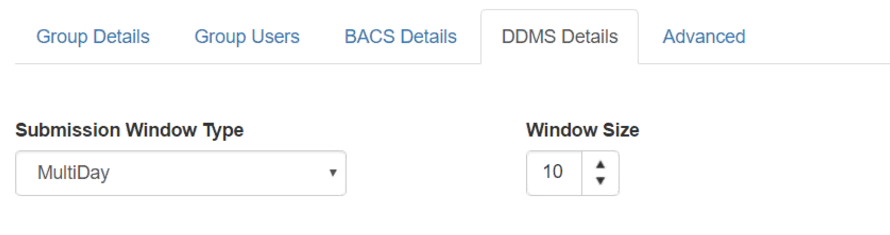
If you do not wish to use look-ahead then you can set the Submission Window Type to 'Single Day'. In this mode the submission will consist of only payers that have a pending collection on the current BACS collection date.
Mopping Up
If you miss running a submission then collections could be missed because they will no longer be eligible to be added to a submission. When you create a new submission, PayGate will look back a number of days and add any missing collections to the submission. There is a strict limit to the number of days that PayGate will go back and this is controlled by the Direct Debit Scheme rules. To keep you in conformance with the Scheme Rules, PayGate will rigidly enforce this.