Processing a Submission


Pre-Submission Validation
Pre-submission Validation is a validation process that PayGate performs on the submission data. The data is checked against dozens of BACS scheme rules and PayGate configuration settings to ensure that the submission won't be rejected by BACS for a technical reason and that the submission does not break PayGate group or user rules defined by the administrator and group administrators.
Pre-submission validation can result in two categories of problem:
Fix - These are serious errors that either break PayGate security rules or they break BACS scheme rules that would result in BACS rejecting the submission.
Warning - These are minor issues that you should be aware of. The submission will likely be accepted by BACS but the submission data may be amended by BACS in order to process the submission.
Handling Serious Errors
If the submission contains errors that would prevent BACS from being able to process it then PayGate will not allow the submission to continue.

The specific reason for the pre-submission failure will be indicated in the results table. Serious errors that cannot be automatically fixed are marked as 'Fix' in the result column. This indicates that you need to fix the problem before PayGate will allow the submission to continue.

Handling Warnings
Warnings are minor issues with the submission data that do not normally cause the submission to fail. If PayGate finds any warning in the submission data as it scans through the submission a message will be displayed.

A list of all of the items that cause warnings are also displayed.
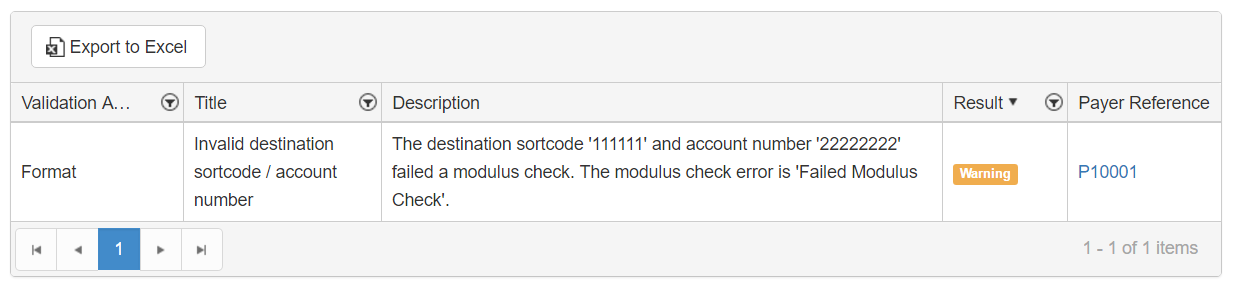
In this case a payer's sortcode and account number did not pass the validation process and may be invalid. At this point you can stop the submission and check the data. You may wish, in the case, to contact the payer and check they are provided the correct bank details.
You can ignore warnings and go ahead with the submission. Click 'Accept warnings and process submission' to proceed with the submission.
Completing Submission Processing
Proceeding with the submission process after the validation process will convert the collection data into a BACS formatted submission file ready for signing, approving and submission to BACS. If the submission was created correctly you will see a green bar telling you that the submission was created successfully.
